
Last updated: August 2026 · Tested by AiZonePro on a 2GB RAM Android device

If you’ve ever opened an AI app on your phone and watched it freeze, crash, or take forever to load a single response, you already know the frustration. Most “best AI tools” articles are written by people testing on flagship phones with 8GB or 12GB of RAM. That advice is almost useless if you’re one of the millions of Android users across Pakistan and Asia still relying on a 2GB RAM device for everyday tasks.
This guide takes a different approach. Every recommendation here is chosen specifically for free AI tools for 2GB RAM Android phones — tools that don’t demand memory you simply don’t have. You’ll learn which options genuinely work on low-end devices, how to access them without a VPN or credit card, and the small habits that make the difference between a smooth AI experience and a frozen screen.
Direct answer: The most reliable free AI tools for 2GB RAM Android phones are browser-based platforms — ChatGPT (web version), Perplexity AI, Microsoft Copilot, and the standard Gemini app — because they run through your browser or a lightweight app shell instead of installing a heavy program that competes for your limited memory. Before installing any new AI app on a low-RAM phone, learn how to spot fake AI update scams so you don’t accidentally install an unsafe APK.
Quick Summary Table
| Tool | Access Method | RAM Friendliness | Data Usage | Best For |
|---|---|---|---|---|
| ChatGPT (web) | Browser | High | Low–Medium | Writing, homework, general Q&A |
| Perplexity AI | Browser/App | High | Low | Research with sources |
| Microsoft Copilot | Browser/App | High | Low | Free GPT-level answers |
| Gemini (standard app) | App | Medium | Low–Medium | Search, quick summaries |
| Canva AI (web) | Browser | Medium | Medium | Simple design, thumbnails |
| Remini / photo AI apps | App | Low | Medium–High | Photo enhancement (use sparingly) |
Why AI Tools Struggle on 2GB RAM Android Phones
To choose the right free AI tools for 2GB RAM Android phones, it helps to understand what’s actually happening inside your device. Android itself uses a large chunk of your total RAM just to keep the operating system running. On a 2GB RAM phone, that often leaves under 800MB genuinely free for apps — and that’s before you open WhatsApp, Facebook, or your camera app in the background. Before installing a newly released AI app on a budget phone, it’s also worth checking the latest AI tool updates to see whether its features or device requirements have changed.
Three things typically cause AI tools to lag or crash on budget devices:
- Heavy installed apps — many AI apps run background services even when you’re not actively using them, quietly eating memory over time.
- On-device AI processing — some newer apps try to run AI models directly on the phone’s hardware, which needs far more memory than a 2GB device has available.
- Too many active background apps — AI tools have to compete for the same limited memory as everything else already open on your phone.
It’s worth clearing up a common misconception here. Google’s newer “Gemini Intelligence“ feature set — the agentic, on-device automation layer — officially requires 12GB of RAM and a flagship chipset, so it simply won’t run on budget phones. But the standard Gemini app, the one most people actually use for chatting and search, works on far lower specs and functions fine on a 2GB RAM device with a stable connection. This distinction matters because a lot of free AI tools for 2GB RAM Android phones content online blurs the two together.
Best Free AI Tools for 2GB RAM Android Phones
1. ChatGPT (Browser Version)
You don’t need to install the ChatGPT app to use it. Opening chat.openai.com in any browser gives you the same chatbot experience without a permanent background process draining your RAM.
Why it’s one of the best free AI tools for 2GB RAM Android phones: No installation means no idle memory usage when you’re not actively using it — it only consumes resources while the tab is open.
Good for: Homework help, email drafting, general writing, brainstorming.
Limitation: Very long conversations can slow down the page on older phones. Starting a new chat occasionally helps.
2. Perplexity AI
Perplexity answers questions with cited sources attached, which is genuinely useful for students who need to double-check information for assignments. Its browser interface is noticeably lighter than most competing AI apps.
Good for: Research papers, fact-checking, university-level assignments.
Students using budget Android phones can also explore our Best Free AI Tools for Students in Pakistan 2026 guide for study, assignments, and freelancing.
3. Microsoft Copilot
Copilot gives free access to advanced AI models through a simple interface, and like ChatGPT, it works well through a browser rather than requiring the full app install.
Good for: Users who want strong AI responses without paying for a premium subscription.
4. Gemini (Standard App)
As explained above, the standard Gemini app — not the 12GB-hungry “Gemini Intelligence” features — works reasonably well on Android 10 and above with 2GB RAM, especially for quick searches and short summaries.
Good for: Fast answers, voice search, basic day-to-day queries.
Limitation: Advanced agentic features (multi-step automation, on-device generation) are not available on low-RAM devices, and that’s expected.
Pakistani freelancers working from budget Android phones can also see our free AI tools Pakistani freelancers actually use guide for tools tested on a 3GB RAM device during real freelance work.
5. Canva AI (Web Version)
Canva’s AI design features — Magic Write, background remover, simple templates — are accessible through the mobile browser version, which avoids the heavier memory footprint of the full Canva app.
Good for: Basic thumbnails, social posts, quick graphics.
If you want to explore more AI tools that work in Pakistan without a VPN, check our Free AI Tools That Actually Work Without VPN in Pakistan tested list.
Best Free AI Tools for Common Budget Phones in Pakistan
Most generic AI tool lists ignore the specific devices Pakistani users actually own. Below is a general reference for how popular budget phone series typically perform, based on their standard RAM configurations. If you own one of these, use this as a starting guide — and see the testing template further down to record your own results.
| Phone Series (Common RAM) | Best Suited Tools | Notes |
|---|---|---|
| Infinix Hot series (2–3GB) | ChatGPT web, Perplexity | Browser-only recommended |
| Itel A-series (1–2GB) | ChatGPT web (text-only mode) | Avoid image-heavy tools |
| Tecno Spark (2–3GB) | Copilot, Gemini standard app | Close background apps first |
| Samsung Galaxy A0x (older, 2–3GB) | Gemini, ChatGPT web | Clear cache weekly |
Note: RAM configurations vary by exact model and region. Always check your specific phone’s settings under About Phone before relying on these general patterns.
Real-Device Testing Template
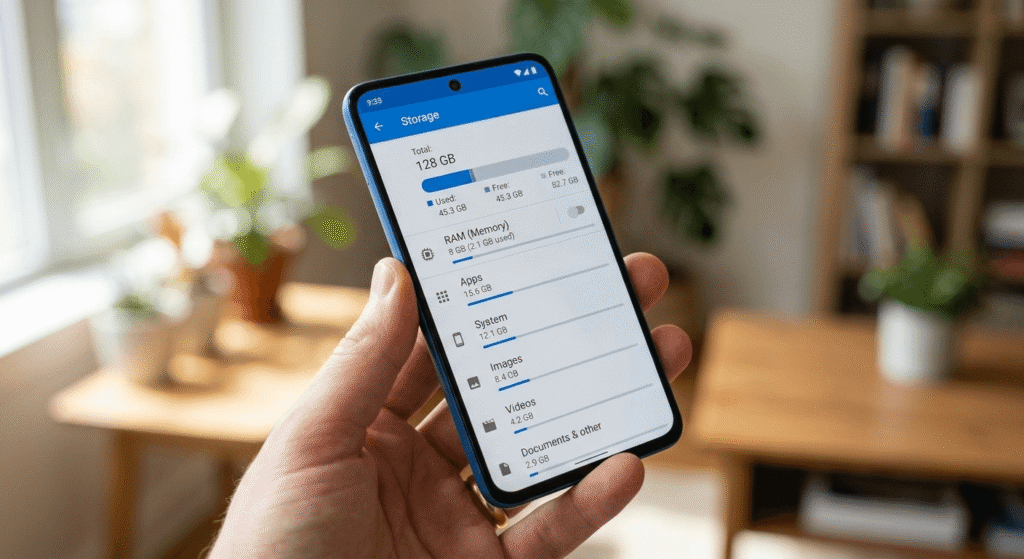
Genuine testing matters more than generic claims. If you want to verify these recommendations on your own device, here’s a simple format to record results — the same approach used for the general guidance above:
| Tool | Load Time | Crashed? (Y/N) | Data Used (approx.) | Notes |
|---|---|---|---|---|
| ChatGPT web | ||||
| Perplexity | ||||
| Gemini app | ||||
| Copilot |
Filling this out on your own 2GB RAM phone gives you data that’s specific to your exact device — which is ultimately more reliable than any general list, including this one.
App-Based vs Browser-Based AI Tools
Before installing any unfamiliar AI app on a budget phone, use this free AI tools scam checklist to check whether the app is legitimate and safe.
| Factor | Installed App | Browser-Based Tool |
|---|---|---|
| RAM usage | Higher (background processes) | Lower (active only while open) |
| Storage needed | Often 100MB+ | None |
| Updates | Manual, frequent | Automatic, always current |
| Best for 2GB RAM | Situational | Generally recommended |
Pros and Cons of Free AI Tools for 2GB RAM Android Phones
Pros:
- Most options listed are completely free to use
- No VPN or credit card required for basic access
- No storage used since nothing needs installing
- Compatible with most phones running Android 8.0 and above
Cons:
- Advanced features like AI image or video generation may still lag
- Too many open browser tabs can slow things down over time
- Weak or inconsistent internet affects performance more noticeably on budget devices
Common Mistakes That Slow Down AI Tools on Budget Phones
- Installing the full app instead of using the browser version — this is the single biggest cause of unnecessary lag.
- Keeping multiple tabs or apps open — each one holds onto memory even when idle.
- Never clearing browser cache — a full cache competes directly with AI tools for available RAM.
- Switching between several AI tools at once — without closing each one properly, memory use adds up quickly.
- Ignoring storage space — a nearly full phone can slow down overall performance, indirectly affecting how AI tools run.
Before installing any unfamiliar AI app, use our AI Earning Apps vs Scam Apps Verification Checklist to spot suspicious apps and avoid common online earning scams.
Practical Tips for Smoother AI Tool Performance
- Use a lightweight browser such as Chrome Lite, Opera Mini, or Firefox Focus
- Close unused apps before opening any AI tool
- Clear your browser cache weekly
- Disable autoplay videos and animations in browser settings
- Restart your phone every few days to clear lingering background processes
If you want to build a practical collection of free AI tools instead of relying on one platform, follow our A Beginner’s 30-Day Free AI Tool Stack week-by-week guide.
Case Study: Switching from App to Browser Access

A common pattern among students using 2GB RAM phones in Pakistan involves installing the full ChatGPT app, experiencing repeated freezing during typing, and assuming the tool itself is simply “too heavy” for their phone. Switching to the browser version at chat.openai.com — without changing anything else about the device — typically resolves most of the freezing, since the browser tab only draws memory while it’s actively open, unlike an installed app running background services.
This pattern repeats across most free AI tools for 2GB RAM Android phones: the tool usually isn’t the actual problem. How it’s accessed almost always is.
Frequently Asked Questions
Can AI apps run on a 2GB RAM phone?
Yes. Browser-based tools like ChatGPT, Perplexity, and the standard Gemini app run reasonably well on 2GB RAM, while heavier installed apps with image or video generation often struggle.
Which free AI tool uses the least RAM?
Browser-based ChatGPT and Perplexity generally use the least memory since they don’t run persistent background services like installed apps do.
Do free AI tools work without a VPN in Pakistan?
As of 2026, most major AI tools — including ChatGPT, Gemini, and Perplexity — are accessible in Pakistan without a VPN. Availability can shift, so it’s worth checking occasionally.
Is Gemini Intelligence the same as the regular Gemini app?
No. Gemini Intelligence refers to newer on-device agentic features that require 12GB of RAM and a flagship chip. The standard Gemini app used for chatting and search works on much lower specs, including 2GB RAM devices.
Is it safe to use free AI tools on an older Android phone?
Yes, as long as you stick to official platforms. Avoid third-party “modded” AI app downloads, which are a common source of malware on older devices.
What’s the minimum RAM needed for AI tools to work at all?
Most browser-based tools function acceptably from 2GB RAM upward. Locally-processed AI features typically need significantly more — often 8GB or higher.
Why does my AI app keep crashing on my phone?
Usually it’s a combination of low free RAM, too many background apps, or a full storage drive. Switching to the browser version of the same tool often fixes this immediately.
Conclusion
Owning a 2GB RAM Android phone doesn’t have to mean missing out on AI in 2026. The real key to finding reliable free AI tools for 2GB RAM Android phones is choosing the right access method — browser-based over app-installed — and building a few simple habits like clearing your cache and closing unused tabs. Tools like ChatGPT web, Perplexity, Microsoft Copilot, and the standard Gemini app prove that a budget device is not a barrier to useful AI assistance. As more platforms move toward lighter, browser-first designs, users on 2GB RAM phones across Pakistan and Asia will find it only gets easier to stay connected to these tools — no upgrade required.