
Last Updated: July 2026 | Written by Muhammad Ismail, Founder of AiZonePro.com

If you have received a WhatsApp message or pop-up telling you to “update your AI app now,” pause before you tap anything. This is exactly how a fake AI update scam alert Pakistan situation usually begins, and it is spreading faster than most beginners realize.
We test AI tools for Pakistani users every week at AiZonePro, and over the past few months we have seen a clear rise in messages that copy the look of real AI update notices. This guide breaks down exactly how these scams work, the real warning signs to check, a verified Pakistani case study, and the exact steps to take if you already clicked a suspicious link.
Quick Answer: A fake AI update scam alert in Pakistan refers to fraudulent messages, apps, or pop-ups pretending to be official updates from real AI tools like ChatGPT or AI-powered banking assistants. Their goal is to steal your personal data, banking details, or install malware. You can spot one by checking the sender, the link’s domain, and whether the app store listing matches the real developer.
Why Fake AI Update Scams Are Rising in Pakistan
AI tools such as ChatGPT, Gemini, and various AI-powered finance apps are now part of daily life for millions of people across Pakistan — students, freelancers, and small business owners included. Scammers have noticed this trust, and a fake AI update scam alert Pakistan pattern has emerged as a direct result.
This isn’t a completely new scam style. Pakistan has already seen the same formula used against banking apps and delivery services: take a trusted brand name, add urgency, and push a fake “update” through social media or SMS instead of an official app store. The same trick is now being reused for AI apps because “AI” feels new, official, and exciting — which makes people less likely to question it.
Three reasons this scam pattern is spreading quickly:
- Low public awareness. Most online safety content covers banking or shopping scams, not AI-specific update fraud.
- Heavy reliance on WhatsApp and Facebook. Scam links travel faster through personal chats than through verified news sources.
- Mobile wallet integration. Many fake apps request JazzCash or Easypaisa access “to confirm the update,” which is one of the clearest scam signals. If you’re looking for legitimate options instead, our guide to free AI tools without a VPN or credit card can help you find safer alternatives.
How a Fake AI Update Scam Actually Works
Understanding the mechanics behind a fake AI update scam alert Pakistan case makes it far easier to catch one before any damage happens.
Step 1: The Bait
You receive a message, ad, or in-app pop-up saying something like “New AI Update Available — Install Now” or “Your AI App Needs Urgent Verification.” Urgency language (“act immediately” or “access will be suspended”) is meant to rush your reaction before you can think it through.
Step 2: The Fake Link
The link usually points to a website with a URL that looks close to the real one but isn’t quite right — an extra word, a dash, or a different domain ending entirely.
Step 3: The Data Request
Once you tap “update” or “verify,” the fake page may ask for:
- Your phone number and OTP code
- Banking or mobile wallet login details
- Permission to install an APK file from outside the official app store
Step 4: The Damage
Depending on what information you share, scammers can access your mobile wallet, use your identity for further fraud, or install malware that quietly monitors your device.
7 Warning Signs of a Fake AI Update
| # | Red Flag | Why It Matters |
|---|---|---|
| 1 | Update sent via WhatsApp/SMS, not the app itself | Official updates rarely arrive this way |
| 2 | Link domain doesn’t exactly match the real app’s website | Scammers use lookalike domains |
| 3 | Asks for OTP, CNIC, or banking details to “verify” | Genuine updates never require this |
| 4 | File is an APK from outside Google Play/App Store | Sideloaded apps skip built-in safety checks |
| 5 | Awkward grammar or unnatural Urdu-English mixing | Common sign of a rushed scam page |
| 6 | Creates panic with countdown-style urgency | Classic pressure tactic |
| 7 | Promises unrealistic bonus features or free premium access | Bait to increase click-through |
Any single warning sign above is reason enough to stop and verify before continuing — this is the core of every fake AI update scam alert Pakistan case reported so far. If you want a broader safety check before signing up for an unfamiliar AI platform, use our free AI tools scam checklist to verify the tool before sharing your information.
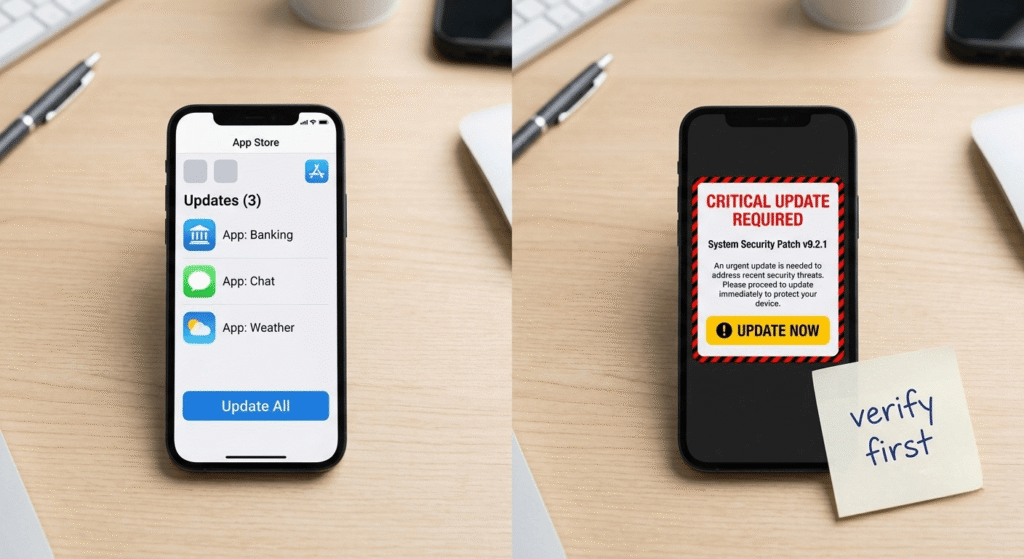
Real vs Fake AI Update: Side-by-Side Comparison
| Feature | Genuine AI Update | Fake AI Update |
|---|---|---|
| Source | Official app store or in-app notice | WhatsApp, SMS, or Facebook ad |
| Domain | Matches the company’s real website exactly | Slightly altered or unrelated domain |
| Permissions requested | Only what the app normally needs | Banking, OTP, contacts, SMS access |
| Urgency level | Calm, no forced deadline | High pressure, countdown warnings |
| Download method | Through the official app store | Direct APK download link |
Case Study: The Pattern Already Seen in Pakistan
While large-scale cases naming specific AI chatbots are still emerging, Pakistan has already lived through the exact same scam formula applied to banking apps. In one widely reported incident, scammers ran Facebook ads promoting a fraudulent version of a major Pakistani bank’s mobile app, falsely labeled as an “updated version,” built purely to steal banking card details. The fake app used a domain completely different from the bank’s real website, and the ad was eventually removed — but only after it had already reached real users.
This matters because it is the same template scammers are now recycling for AI tools: borrow a trusted name, attach the word “update,” create urgency, and distribute it through social media or messaging apps instead of an official store. Whether the brand is a bank or an AI app, the delivery method and the domain are what expose the fraud — not the branding.
Step-by-Step: How to Verify an AI Update Is Real

- Close the message or pop-up without clicking anything inside it.
- Open the official app store directly (Google Play or Apple App Store) and search for the app by name.
- Check the developer name on the store listing — it must match the real company. If you’re using a budget device, you can also check our guide to the best free AI tools for 2GB RAM Android phones before downloading new AI apps.
- Compare the update notes on the store page with what the message claimed.
- Visit the company’s official website separately, typing the address yourself instead of clicking the link. If you prefer to try AI tools without creating accounts or sharing information unnecessarily, see our guide to free AI tools without signing up.
- If still unsure, wait 24–48 hours. Real update announcements typically get confirmed by several reliable outlets within a day or so.
For a broader method of checking whether AI-related claims are genuine before trusting or sharing them, see how I verify AI news before publishing.
Following these steps consistently is the single best defense against any fake AI update scam alert Pakistan attempt you come across.
What to Do If You Already Clicked a Fake Link
- Do not enter any further information on the page.
- If you shared banking or wallet details, contact your bank or JazzCash/Easypaisa support immediately to freeze the account.
- Change passwords for any accounts linked to that phone number or email.
- Run a security scan using a trusted antivirus app.
- Report the incident to Pakistan’s National Cyber Crime Investigation Agency (NCCIA) under the FIA, or through the PTA complaint portal.
- Warn friends and family — the same fake AI update scam alert Pakistan message is often sent to entire contact lists at once.
Common Mistakes Beginners Make
- Clicking “update now” out of fear of losing app access. The same caution applies to AI earning platforms, so compare legit AI earning apps vs scam apps before trusting any service that promises easy income.
- Entering banking details “just to verify” an update
- Downloading APK files shared inside WhatsApp groups
- Assuming a professional design automatically means it’s official
- Not warning family members, who are often more vulnerable to the same scam
Pros and Cons of AI Update Notifications
Pros of genuine AI updates:
- Better accuracy and new features
- Security patches that protect your data
- Usually free for basic users
Cons if you’re not careful:
- Scammers exploit the excitement around new features
- Beginners may not know how to verify authenticity
- Fake versions can look nearly identical to real ones
Expert Recommendation
The safest long-term habit is simple: treat every unexpected “update” message as unverified until you confirm it yourself through the official app store. Genuine AI companies rarely force urgent updates through personal messaging apps. When a message pushes you toward panic, that reaction itself is often the clearest clue you’re facing a fake AI update scam alert Pakistan attempt.
FAQs
Is every AI update notification a scam? No. Notifications that show up directly inside the app or through the official store are typically legitimate. The risk mainly comes from updates promoted through WhatsApp, SMS, or social media ads.
How do I know if an AI app update link is safe? Check whether the domain exactly matches the company’s official website, avoid clicking links from unsolicited messages, and confirm the update inside the app store instead.
Can a fake AI update steal my JazzCash or Easypaisa details? Yes, if the fake page or app asks for your OTP, PIN, or wallet login under the excuse of “verifying” the update. Never share this information for an app update.
What should I do if I downloaded a fake AI update APK? Uninstall it immediately, run a security scan, change any passwords entered afterward, and monitor your bank or wallet accounts for unusual activity.
Where can I report a fake AI update scam in Pakistan? Report it to the FIA’s National Cyber Crime Investigation Agency (NCCIA) or through the Pakistan Telecommunication Authority (PTA) complaint system.
Is it generally safe to use AI apps in Pakistan? Yes, when downloaded through official app stores directly from the real developer. The danger comes from unofficial sources and unsolicited update links, not the AI tools themselves.
Why are AI update scams increasing right now? Because AI tools have become mainstream and trusted, and scammers are reusing the same tactics that once targeted banking and delivery brand names.
Conclusion
A fake AI update scam alert Pakistan situation is really the newest version of an old trick: borrow a trusted name, create urgency, and push people to act before they think. The good news is that spotting one doesn’t require technical skills — just a habit of pausing before you tap “update.”
Always verify updates through the official app store, never share OTPs or wallet details for an “update,” and report suspicious activity to NCCIA or PTA when you spot it. As AI tools continue growing across Pakistan and the wider Asian region, staying alert to every fake AI update scam alert Pakistan pattern will only become more important. A few seconds of verification today can save you from a scam that takes much longer to undo. If you’re specifically searching for newly released AI platforms, our new AI tools without VPN in Pakistan guide provides a separate list of tools with their access and signup details.