
Last updated: June 2026

If you’ve ever spent an hour manually copying data between an email inbox and a spreadsheet, you already understand why people are searching for how to learn AI automation for beginners in growing numbers. It’s the skill of teaching software to handle repetitive digital work — and in 2026, it’s one of the most beginner-accessible, in-demand tech skills, especially for learners across Pakistan looking to build remote income without a computer science degree, a powerful laptop, or even a credit card.
This guide walks through exactly how to learn AI automation for beginners starting from zero, using free tools that work on slow internet connections and without international payment methods most banks in Pakistan don’t easily support.
This guide breaks down AI automation for beginners into simple, practical stages anyone can follow.
Quick answer: To learn AI automation as a beginner, pick one free no-code tool, understand triggers and actions, add a single AI step, build three small real projects, then gradually explore more powerful tools. Most beginners get their first working automation running within a single day, even on a basic smartphone or shared computer.
What You’ll Learn in This Roadmap
- What AI automation actually means, in plain language
- A complete roadmap for AI automation for beginners, step by step
- Free tools that work well from Pakistan, without a credit card
- A real platform comparison
- Common beginner mistakes to avoid
- How this skill turns into real income in PKR
What Is AI Automation? (Direct Answer)
Understanding AI automation for beginners starts with one simple distinction.
AI automation combines basic task automation — “if this happens, do that” — with an AI step that can read, summarize, classify, or generate content inside the workflow. Instead of just shifting data between apps, the system can now make small decisions, like sorting customer messages by urgency, before completing the task.
In plain words: regular automation moves things around. AI automation also understands what it’s moving.
If you’re new to AI and want to start from your phone, follow this free AI tools for beginners 2026 step-by-step mobile guide with no credit card or investment required.
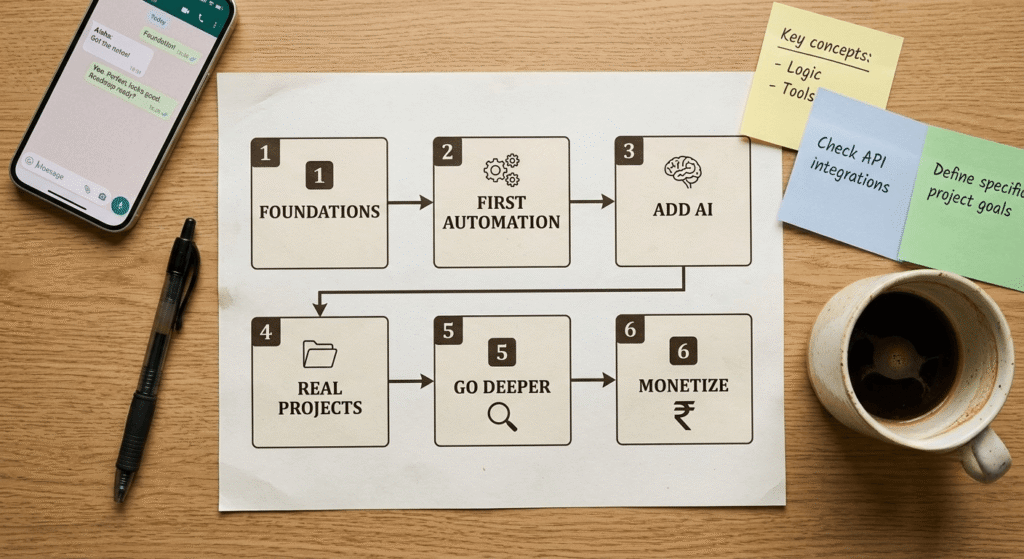
Summary Table: AI Automation Roadmap at a Glance
Here’s the full AI automation for beginners roadmap at a glance.
| Stage | What You Do | Time Needed | Tools |
|---|---|---|---|
| 1. Foundations | Learn core concepts | 2–4 days | YouTube, free guides |
| 2. First Automation | Build a no-code workflow | 1 day | Zapier or Make (free tier) |
| 3. Add AI | Insert an AI step | 1–2 days | Built-in AI features |
| 4. Real Projects | Build 3 small automations | 1–2 weeks | Make, Zapier, Google tools |
| 5. Go Deeper | Try advanced/self-hosted tools | 2–4 weeks | n8n |
| 6. Monetize | Offer automation as a service | Ongoing | Fiverr, Upwork, local clients |
Step-by-Step Roadmap to Learn AI Automation
Step 1: Understand the Core Vocabulary First
Before opening any tool, learn four words: trigger (what starts the automation), action (what happens next), workflow (the full chain), and node (a single step in that chain). This is genuinely the fastest way to learn AI automation for beginners, because most confusing tutorials become clear once these click.
Step 2: Pick One Free Tool and Stick With It
Don’t try to learn five platforms at once. Zapier’s free plan (100 tasks/month) is the easiest starting point because of its guided interface and because it doesn’t require a credit card to start the free tier. Make.com is a close second, with a more visual canvas.
Step 3: Build a Boring First Automation on Purpose
Your first project shouldn’t be ambitious. A solid starter: “When I get a new email in Gmail, save it automatically to a Google Sheet.” Simple, working in minutes, and it teaches the trigger-action pattern every future automation builds on.
Step 4: Add Your First AI Step
Once your basic automation works, insert an AI action — for example, asking it to read an email and classify it as Inquiry, Complaint, or Spam before logging it. This is the exact moment automation becomes AI automation.
Step 5: Build Three Small, Real Projects
Practical repetition beats theory. Try an automatic email summarizer, a social caption generator from blog posts, and a simple lead-sorting workflow. Each teaches a reusable pattern.
Step 6: Move Toward n8n When You’re Ready
n8n is open-source and self-hostable, meaning no per-task costs — useful once you’re automating at higher volume. It has a steeper learning curve, so most beginners spend 2–3 weeks on Zapier or Make first.
Beginners can also follow our 30-day AI tool learning plan to gain hands-on experience before moving into automation.
AI Automation for Beginners in Pakistan: What’s Different

AI automation for beginners looks slightly different depending on where you live, and most global guides assume you have a strong internet connection, an international credit card, and a desktop computer. For learners in Pakistan, the realistic path looks slightly different:
- No credit card needed to start: Zapier, Make, and n8n’s free tiers don’t require payment details upfront — you can practice for weeks without one. You can also explore our collection of AI tools without a credit card that are accessible for beginners in Pakistan.
- Mobile-first practice: Most automation dashboards are browser-based and work on Jazz, Zong, or any 4G connection through Chrome on a phone, though a tablet or shared computer makes building easier.
- Getting paid: Once you offer automation services on Fiverr or Upwork, payments typically arrive via Payoneer, which connects to local bank accounts, JazzCash, or Easypaisa for cash-out.
- Realistic earning range: Beginners offering simple automation setups (email sorting, lead capture, basic AI chatbots) on Fiverr typically charge anywhere from PKR 3,000–15,000 per small project once they have 2–3 portfolio pieces — these are realistic starting numbers, not guaranteed income.
- Slow-internet workaround: If your connection is inconsistent, n8n’s self-hosted option (run on a cheap VPS) loads faster than cloud dashboards since you control the server location.
If you want a simple payout method, follow this how to withdraw Fiverr & Upwork earnings in Pakistan (JazzCash & Easypaisa guide 2026) to cash out your freelancing income easily.
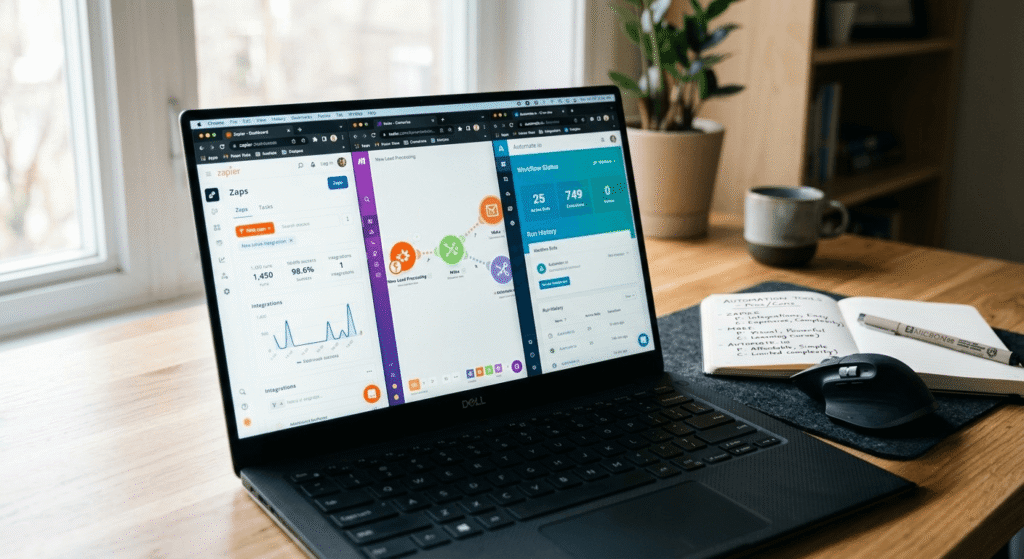
Platform Comparison: Zapier vs Make vs n8n
| Feature | Zapier | Make | n8n |
|---|---|---|---|
| Beginner-friendly | Very high | High | Moderate |
| Free tier | 100 tasks/month | Generous free plan | Free if self-hosted |
| Credit card required for free tier | No | No | No (self-hosted) |
| Coding needed | None | None | Optional |
| Best for | Fast simple workflows | Visual complex workflows | Full control, no per-task cost |
Pros of starting with no-code tools:
- No technical background required
- Visual interfaces reduce learning time
- Free tiers are enough to practice for weeks
- Works without a credit card
Cons to be aware of:
- Free tiers have task limits
- Advanced custom logic eventually needs n8n or basic coding
- Some AI features require a paid model API key later on
Real-World Case Study: A Simple Business Workflow
A small online store automated its customer support inbox using Make.com combined with an AI model. The AI read every incoming email, summarized it in one line, and tagged it by urgency before a human opened it. Manual sorting time dropped from roughly 20 minutes per batch to near-instant categorization. This is the same beginner-level pattern that’s commonly rebuilt as a practice project — and later sold as a paid service to small local businesses.
If you’re starting an online business, check this complete guide on AI dropshipping free tutorial for beginners in 2026 to learn how to build and grow a store step by step using AI tools.
Common Mistakes Beginners Make
These are the most common mistakes people make with AI automation for beginners.
- Trying to learn every tool at once instead of mastering one
- Skipping the simple first project and jumping straight to complex AI agents
- Ignoring free-tier limits and getting stuck mid-project
- Assuming international payment methods are required to start (they’re not)
- Assuming automation requires coding, which discourages many beginners unnecessarily
Expert Recommendations
For anyone serious about AI automation for beginners, treat your first month as practice, not income. Build five to seven small automations purely to understand patterns before monetizing. Once comfortable, Fiverr and Upwork are realistic starting points for offering automation services, since demand for this exact skill set is rising across global freelance markets — including from clients specifically looking for affordable talent from Pakistan and South Asia.
If you want to start earning online from scratch, check this complete guide on how to start AI freelancing in 2026 with no experience, no laptop, and no investment.
Is AI Automation a Good Skill to Learn in 2026?
Direct answer: Yes — it remains one of the highest-demand, beginner-accessible tech skills in 2026, because businesses of every size are reducing manual work, and the no-code tools needed to build these systems keep getting simpler and more affordable.
Explore our complete guide on free AI tools for research papers in Pakistan to find the best AI tools for research, writing, citations, and academic productivity.
People Also Ask
Is coding required to learn AI automation?
No. Most beginner and intermediate work can be done with no-code tools like Zapier, Make, or n8n’s visual builder.
How long does it take to learn AI automation as a beginner?
Basic understanding takes a few days; building genuinely useful automations takes 2–4 weeks of consistent practice.
Can I learn AI automation for free in Pakistan?
Yes. Free tiers on Zapier, Make, and self-hosted n8n require no credit card and are enough to build real practice projects.
Which tool should beginners start with?
Zapier or Make, due to simpler interfaces — move to n8n once core concepts feel comfortable.
How do I get paid for automation work from Pakistan?
Most freelancers receive payments via Payoneer, then withdraw to a local bank account, JazzCash, or Easypaisa.
Do I need a powerful computer to learn AI automation?
No. Most tools are browser-based; a basic laptop, shared computer, or even a smartphone is enough to start.
Can AI automation become a real source of income?
Yes, though earnings vary widely and aren’t guaranteed — many beginners build a small portfolio first, then offer paid services on Fiverr or Upwork.
Conclusion
Learning AI automation as a beginner isn’t about mastering complicated software overnight — it’s about understanding triggers and actions, adding one AI step at a time, and practicing with small real projects. This roadmap for how to learn AI automation for beginners works whether you’re starting on a laptop in Lahore or a smartphone in a smaller city with patchy internet: pick one free tool, build something boring first, add AI gradually, and grow from there. As demand keeps rising into 2026, beginners who start now — even with free, no-credit-card tools — are positioning themselves early for real freelance opportunities built on exactly this skill.
That’s the complete picture of AI automation for beginners in 2026 — start small, stay consistent, and build from there.
Author Bio:
Written by [Muhammad Ismail], founder of AiZonePro.com, where we test and document free AI tools and automation workflows specifically for beginners across Pakistan and Asia.